AI Overlay for LockDown Browser
Access ChatGPT and Claude through an invisible window on macOS.
Excluded from screen capture, recordings, and window lists.
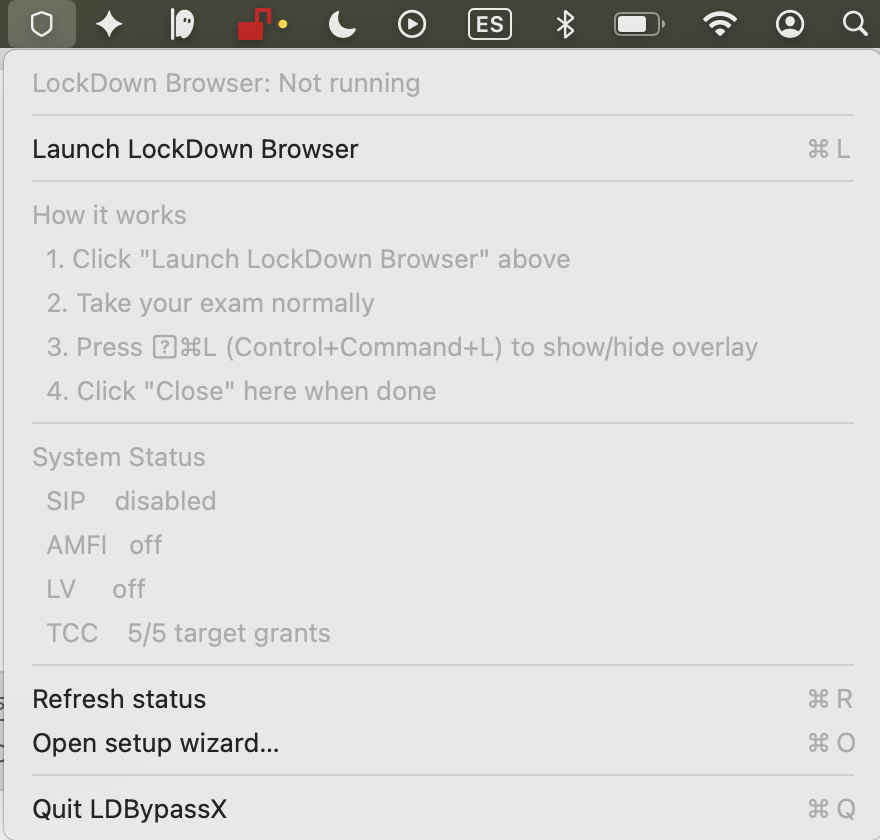
LDBypassX — notarized, universal build for macOS 14+. Launch LockDown Browser from the menu bar shield.
Ask your question, read the answer, then hide. Don't leave it open.
No credit card · macOS 14+ · Apple Silicon & Intel
Verified working 28th of July 2026 · Invisible to LockDown Browser, Proctorio, ProctorU
How it works
Launch LockDown Browser from your menu bar — the overlay loads automatically.
Install LDBypassX
Download the DMG, drag to Applications, and open it. Follow the one-time setup wizard.
Click the shield icon
Look for the shield icon in your menu bar, next to the system clock. Click it and select "Launch LockDown Browser".
Navigate to your exam
LockDown Browser opens with the overlay already injected. Navigate to your institution and exam as you normally would.
Toggle the overlay
During your exam, press the hotkey to show or hide the overlay at any time.
Close when done
Close LockDown Browser normally, or click "Close LockDown Browser" from the shield menu.
Try it yourself -> 24 hours free, no credit card
How It Works
Download
Download and open the app. 30 seconds.
Activate
The app opens your browser. Sign in with Discord or email to link your Mac.
Use
Press ⌃⌘L during your exam. The AI overlay appears - invisible to everything else.
Pricing
Wall-clock time. Buy once, use anytime.
Works with LockDown Browser and major proctoring tools
Trouble with LockDown Browser on Mac?
Our full troubleshooting hub covers installation, permissions, error codes, compatibility, performance, and every "won't open" symptom - 495 in-depth pages across 5 languages, indexed by Google.
freezes · crashes · stuck loading · black screen Camera, microphone, screen-recording
macOS Sequoia + Tahoe TCC explained Error codes -7, -101, -105, -111, A4
step-by-step fixes per code Compatibility matrix
macOS x M1/M2/M3/M4 x LDB version Privacy and data collection
what it sees · lawsuits · uni bans Installation by LMS
Canvas · Blackboard · D2L · Moodle Performance benchmarks
CPU, RAM, battery on Apple Silicon Exam-day flow
before · during · after the proctored exam Hardware compatibility
external cams, mics, monitors, virtual cams App conflicts
VPN, Little Snitch, Grammarly, Parallels vs Honorlock, Proctorio, Examplify
head-to-head detection comparisons Clean uninstall
remove residuals + TCC entries
View the full LockDown Browser on Mac guide ->
Also available in: Deutsch · Español · Português (Brasil) · Français · Deutsch · Deutsch · Deutsch · Deutsch · Deutsch · Deutsch · Deutsch · Deutsch