KI-Overlay für LockDown Browser
Greife auf ChatGPT und Claude über ein unsichtbares Fenster auf macOS zu.
Ausgeschlossen von Bildschirmaufnahme, Aufzeichnungen und Fensterlisten.
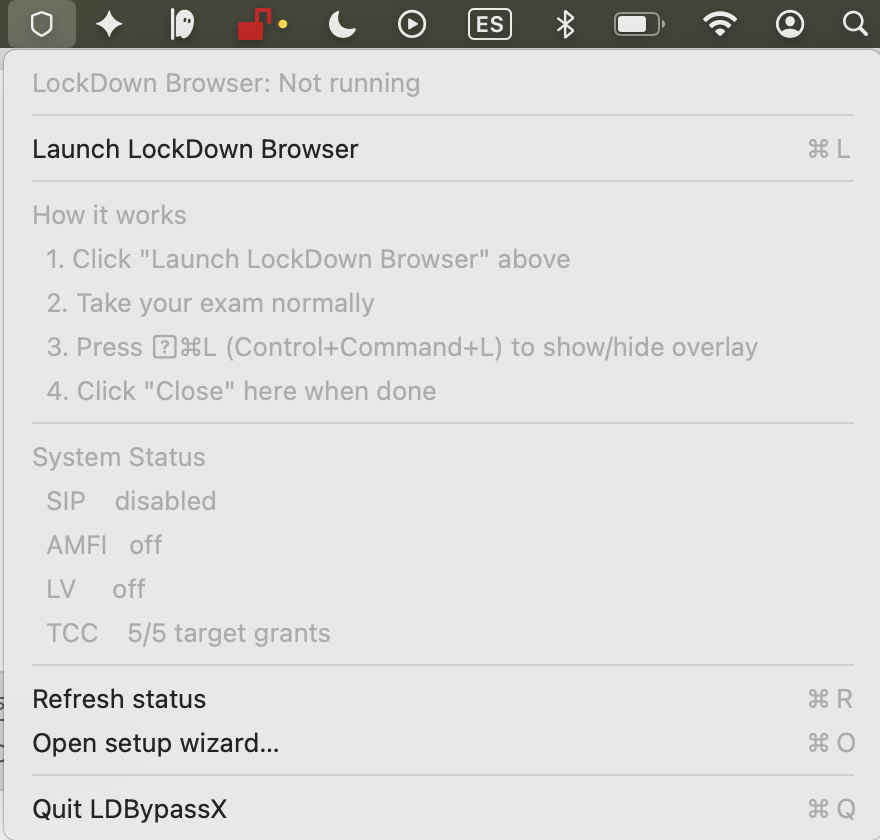
LDBypassX — notarized, universal build for macOS 14+. Launch LockDown Browser from the menu bar shield.
Stelle deine Frage, lies die Antwort, dann ausblenden. Lass es nicht offen.
Keine Kreditkarte · macOS 14+ · Apple Silicon & Intel
Funktion verifiziert 19th of July 2026 · Unsichtbar für LockDown Browser, Proctorio, ProctorU
How it works
Launch LockDown Browser from your menu bar — the overlay loads automatically.
Install LDBypassX
Download the DMG, drag to Applications, and open it. Follow the one-time setup wizard.
Click the shield icon
Look for the shield icon in your menu bar, next to the system clock. Click it and select "Launch LockDown Browser".
Navigate to your exam
LockDown Browser opens with the overlay already injected. Navigate to your institution and exam as you normally would.
Toggle the overlay
During your exam, press the hotkey to show or hide the overlay at any time.
Close when done
Close LockDown Browser normally, or click "Close LockDown Browser" from the shield menu.
Selbst ausprobieren -> 24 Stunden kostenlos, keine Karte
So funktioniert es
Herunterladen
App herunterladen und öffnen. 30 Sekunden.
Aktivieren
Die App öffnet deinen Browser. Melde dich mit Discord oder E-Mail an, um deinen Mac zu verknüpfen.
Verwenden
Drücke ⌃⌘L während deiner Prüfung. Das KI-Overlay erscheint - unsichtbar für alles andere.
Preise
Echtzeit (keine Nutzungszeit). Einmal kaufen, jederzeit nutzen.
Funktioniert mit LockDown Browser und wichtigen Fernüberwachungstools
Probleme mit LockDown Browser auf Mac?
Unser vollständiger Troubleshooting-Hub deckt Installation, Berechtigungen, Fehlercodes, Kompatibilität, Leistung und jedes "öffnet nicht"-Symptom ab - 495 detaillierte Seiten in 5 Sprachen, von Google indiziert.
friert ein · stürzt ab · Ladevorgang hängt · schwarzer Bildschirm Kamera, Mikrofon, Bildschirmaufnahme
macOS Sequoia + Tahoe TCC erklärt Fehlercodes -7, -101, -105, -111, A4
Schritt-für-Schritt-Lösungen pro Code Kompatibilitätsmatrix
macOS x M1/M2/M3/M4 x LDB-Version Datenschutz und Datenerfassung
was er sieht · Klagen · Uni-Verbote Installation nach LMS
Canvas · Blackboard · D2L · Moodle Leistungsbenchmarks
CPU, RAM, Akku auf Apple Silicon Ablauf am Prüfungstag
vor · während · nach der überwachten Prüfung Hardware-Kompatibilität
externe Kameras, Mikrofone, Monitore, virtuelle Kameras App-Konflikte
VPN, Little Snitch, Grammarly, Parallels vs Honorlock, Proctorio, Examplify
direkte Erkennungsvergleiche Saubere Deinstallation
Residuen + TCC-Einträge entfernen
Vollständige Anleitung zu LockDown Browser auf Mac ansehen ->
Auch verfügbar auf: English · Deutsch · Español · Português (Brasil) · Français · Deutsch · Deutsch · Deutsch · Deutsch · Deutsch · Deutsch · Deutsch